⚡ Powered by Google Veo 3  ·  20 free credits on sign‑up

Turn a text prompt into a ready‑to‑import animated game character

Describe a hero, enemy or item. Get a full animation set — idle, walk, run, jump, attack — with the background removed and packaged for Godot, Unity, Aseprite and any 2D engine. Then add level music and sound effects in the same studio. In minutes, not weeks.

No credit card required · Free credits included · One-time purchase, no subscription
fly · 10 frames · 14 fps · looping
bite_forward · 12 frames · 12 fps

Real output, not a mockup — both sprites were generated and cut out in this app.

How it works

From idea to playable asset in three steps

No art skills, no rigging, no frame‑by‑frame drawing. The whole pipeline is automated.

1

Describe your character

Type what you want — “mossy horned forest boss”, “nimble ranger”, a weapon or a pickup. AI generates a clean side‑view sprite in a consistent game‑art style.

2

Generate animations

Pick from tuned presets — idle, walk, run, jump, turn, attack, hurt, death — or write your own. Veo animates your character while keeping it perfectly framed and on‑model.

3

Export to your engine

We remove the background, crop, and slice frames into a sprite sheet — then bundle a single ZIP with everything your engine needs. Drag, drop, done.

One studio

Every generator in a single admin panel

No stitching five services together. Characters, animations, sprite packs, level music and sound effects live behind one login, share one asset library and one credit balance — switch on whatever the project needs.

spriteforge.app/app → Sprites
Sprite pipeline inside the studio

Sprites & animation: the full pipeline on one screen — create the character, generate each animation, cut the frames, build the engine pack.

Features

Built for game developers, not just video

Every output is made to drop straight into a real project.

🎨

Consistent character

Style reference keeps the same character across every animation — no drifting designs between clips.

✂️

Automatic background removal

Clean transparent PNG frames with edge feathering and subject detection — no green screen, no manual masking.

🧩

Sprite sheets + frames

Both packed sprite sheets and individual PNGs, uniformly cropped and sized for pixel‑perfect playback.

🕹️

Preset animation library

Idle, walk, run, jump, turn, attack, hurt, death — each with prompts tuned for locked‑camera, loop‑ready motion.

📦

Character packs

Bundle multiple animations into one character archive with a manifest — a complete moveset in a single download, in a compact runtime build and a full‑resolution one.

Frame editor with versions

Play the cut‑out animation frame by frame, drop the frames you don’t need, erase a leftover blob with one click — then save it as a new version. The original export is never overwritten.

👾

Beyond walk cycles

Stationary traps that strike in three directions, ceiling‑sleeping flyers, bosses with wind‑ups — anything that isn’t a standard walk cycle still gets a clean, loopable set.

🎵

Music tracks

Text‑to‑music with Google Lyria: ~32‑second instrumental loops for levels, menus and boss fights — studio‑quality WAV, 48 kHz stereo, from a one‑line prompt.

🔊

Game sound effects — free

Jumps, coins, hits, power‑ups and UI blips via classic procedural synthesis (sfxr). Instant, unlimited and free — no AI credits, no licensing questions.

🎞️

Video & image tools included

The same studio also does full Veo video generation and Gemini image generation — useful for trailers, key art and marketing.

Examples

One art style, a whole bestiary

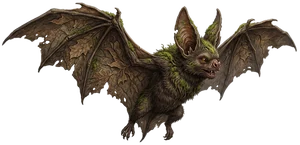
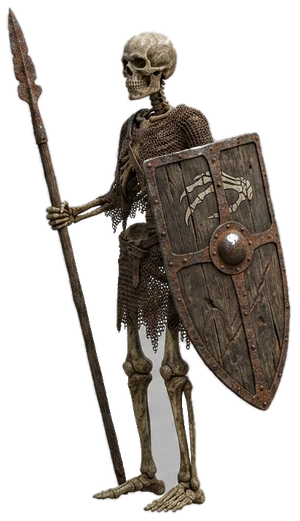
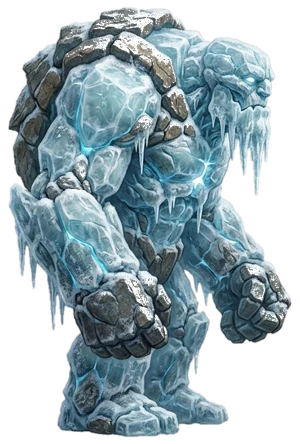
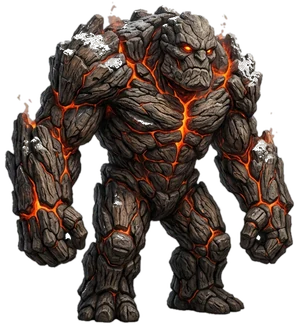
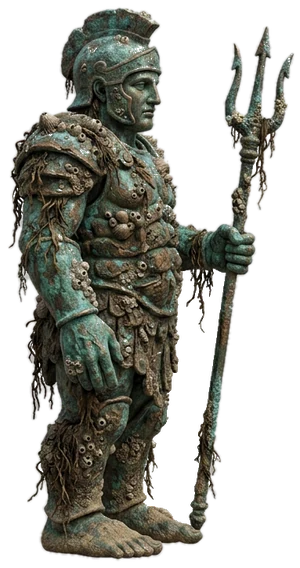
Give the app one character as a style reference and every new enemy comes back in the same painterly look — across forests, dungeons, ice caves, lava depths and sunken ruins.

Audio

Music and sound effects, same workflow

Your enemies need a soundtrack. Generate looping level music with Google Lyria and one‑shot game sounds with a built‑in procedural synth — everything lands in the same library, ready as WAV.

🎵 Level music — Lyria

“gentle mysterious cave ambience, soft harp arpeggios, low strings, distant echoing bells, 70 bpm” →

Real output: ~32 s instrumental loop, WAV 48 kHz stereo. Generated in this app.

🔊 Sound effects — instant & free

Classic sfxr synthesis: click to play real generated samples.

Each click in the app rolls 3 fresh variants. No AI credits — procedural synthesis is free and unlimited.

Engine‑ready exports

One click, every engine

Each pack ships with native project files so you skip the import busywork.

🟦 Godot 4 · SpriteFrames .tres
⬛ Unity · auto‑sliced .meta
🟧 Aseprite · JSON atlas
🎯 Phaser / PixiJS · JSON
🖼️ Raw PNG frames · any engine
Pricing

Pay for what you generate

Simple credits. 1 credit ≈ $0.10. Exporting, packaging, the frame editor and all sound effects are always free — you only pay for AI generation: 16 credits for a 4‑second animation in fast mode, 2 credits per image, 2 credits per music track. Start with 20 free credits.

$12
100 credits
  • ~6 fast animations
  • Enough for one small enemy
  • All export formats
  • Credits never expire
MOST POPULAR
$33
300 credits
  • ~2 full characters
  • Idle/walk/attack/hurt/death sets
  • All export formats
  • Frame editor included
$60
600 credits
  • ~4 full characters
  • Best value per credit
  • All export formats
  • Character packs
$135
1500 credits
  • ~10 characters — a whole bundle
  • For studios & asset shops
  • All export formats
  • Align frames across a character

Secure checkout via Paddle — VAT and taxes handled for you, worldwide.

FAQ

Questions

What exactly do I get in the download?

A ZIP with transparent PNG frames, a packed sprite sheet, an Aseprite‑format JSON atlas, a Godot 4 SpriteFrames .tres, and a Unity auto‑slice .meta — plus a manifest describing every animation. Drop it into your engine and it just works.

Which engines are supported?

Godot 4 and Unity get native project files. Aseprite, Phaser, PixiJS and TexturePacker read the JSON atlas. Any engine can use the raw PNG frames or the sprite sheet.

Do I own the generated assets?

Yes — you can use them in commercial games. Generation runs on Google Veo; please review Google’s terms for AI‑generated content as they apply.

How much does a full character cost?

Each animation is one AI video generation, billed per second: 16 credits for 4 seconds in fast mode, 24 for 6 seconds. A game‑ready enemy usually needs 8–9 animations — idle, walk, two attacks, hurt, death, turn, plus whatever the character calls for — so about 130–180 credits ($13–18) in fast mode, retakes included. The higher‑quality model costs ~2.5× that. Draft in fast mode, then re‑render only the shots you keep.

Can I animate my own artwork?

Yes — upload your own character art and use it as the first frame, and the animation is generated from your image instead of a prompt. You can also feed it as a style reference so newly generated characters match your existing art.

What if one frame comes out wrong?

Open the frame editor: play the animation frame by frame, drop the frames you don’t want, and click any leftover artifact to erase that area across the whole animation. Saving creates a new version, so your original export stays intact — no need to pay for a re‑generation.

Can it do enemies that aren’t humanoid?

Yes. Stationary plants that bite in several directions, bats that sleep on the ceiling and dive, worms, snails, golems, bosses with wind‑up attacks — each gets a tailored animation set with the root pinned so your engine controls the movement.

Does it make music and sound effects too?

Yes. Music: Google Lyria generates ~32‑second instrumental loops (WAV, 48 kHz stereo) from a text prompt — level themes, menus, boss fights, ambience. Sound effects: a built‑in procedural synth (the classic sfxr algorithm) makes jumps, coins, hits and UI blips instantly and for free — each click rolls fresh variants, and favourites can be mutated into similar ones.

Can I use the generated music commercially?

Yes — the output is your content and Google claims no ownership. Two honest caveats: purely AI‑generated music can’t be copyrighted (edit or arrange it to gain protection), and stores like Steam require disclosing AI‑generated content. Procedural sound effects have no such caveats at all.

Is there a free trial?

Yes. Every new account gets 20 free credits — enough to design a character image and animate it once, so you can see the full pipeline end to end before paying anything. No card required.


Ready?

Make your first animated character today

20 free credits. No card. Export to your engine in minutes.

Start free →